
Deprecated: Function visual_composer is deprecated since version 5.8! Use wpbakery instead. in /var/www/upstream/wp-includes/functions.php on line 6170
How to Add Clients and Client Users to Projects - UpStream Documentation Skip to content

Inside the WordPress admin area, go to “Projects” and edit any project.

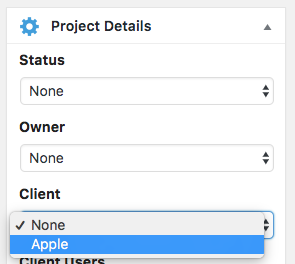
In the right sidebar, you’ll see a Project Details box.

You can now chose your Client from the dropdown. If you haven’t created Clients or Client Users yet, read this first.
After choosing the client, you’ll be able to choose which Client Users to assign to this project:
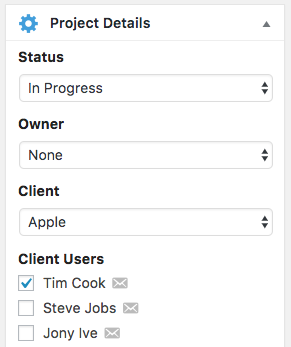
These Client Users can access the frontend view of the project by visiting the /projects/ URL. Find out more about the project URLs here.

Deprecated: preg_split(): Passing null to parameter #2 ($subject) of type string is deprecated in /var/www/upstream/wp-includes/formatting.php on line 616

Deprecated: preg_match(): Passing null to parameter #2 ($subject) of type string is deprecated in /var/www/upstream/wp-includes/class-wp-embed.php on line 446

Deprecated: str_replace(): Passing null to parameter #3 ($subject) of type array|string is deprecated in /var/www/upstream/wp-includes/class-wp-embed.php on line 454

Related Articles